macOS Quick Look extension

Preview .3mf files instantly on Mac

A 3MF viewer for Mac built into Quick Look. Press Space to open a .3mf file on Mac and see a 3D preview of the model — in your actual filament colors for Bambu Studio and OrcaSlicer projects. No slicer needed.

Free & open source · Universal (Apple Silicon + Intel) · Signed & notarized · macOS 13+

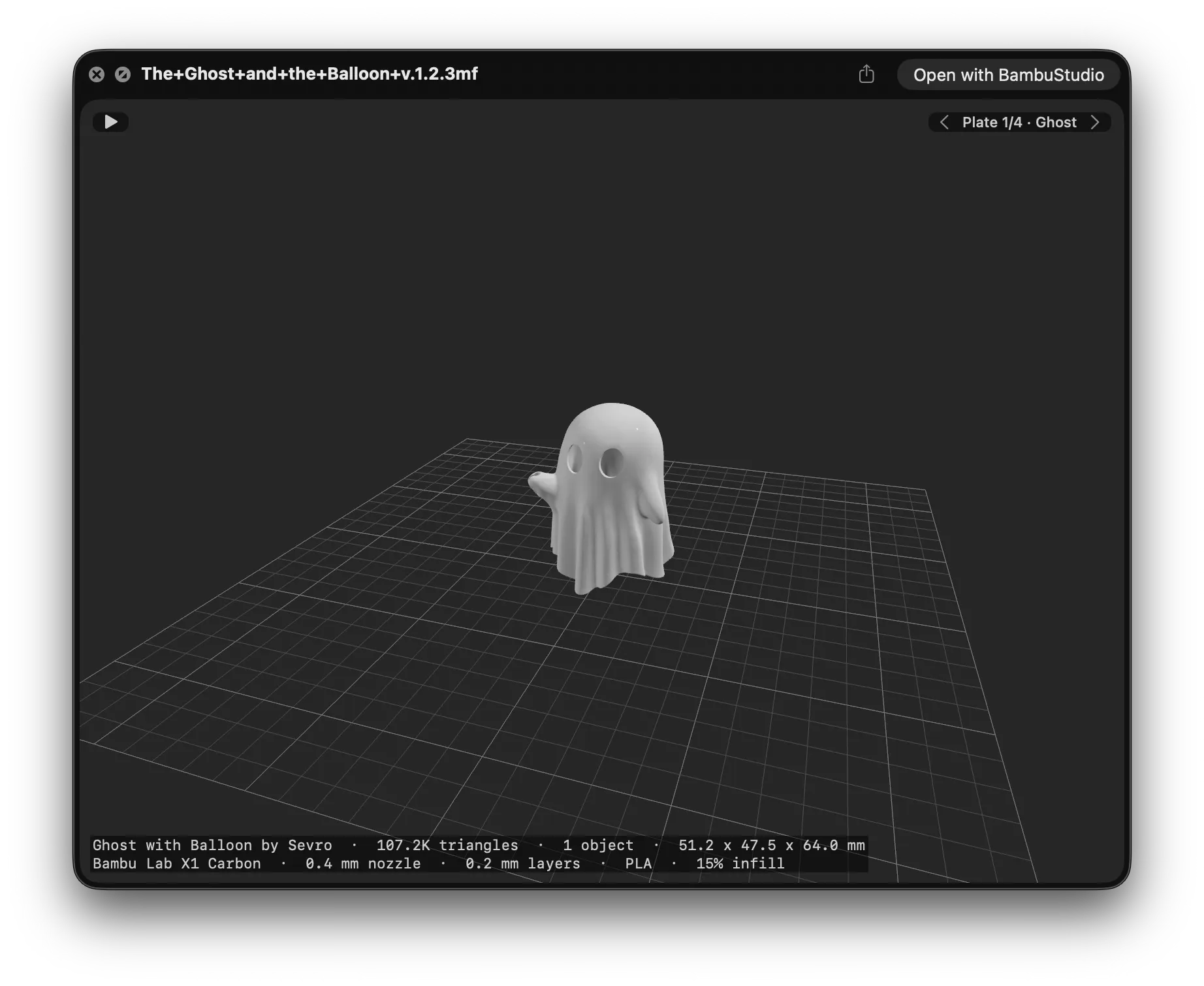
Preview3MF showing a 3D model on a build-plate grid in Quick Look

Everything you need to peek inside a print

A proper 3D preview right in Finder and Quick Look — one that understands slicer projects, not just raw meshes — plus a 3MF thumbnail in Finder on every icon.

🔎

Quick Look integration

Press Space in Finder — the model appears, no app to open.

🧊

Real 3D rendering

SceneKit with proper lighting, shading, and materials.

🌀

Auto-rotating

Spins around the vertical axis so you see every side.

🖱️

Interactive controls

Orbit and zoom with your mouse or trackpad in the preview.

🎨

Your filament colors

Reads the palette out of Bambu Studio and OrcaSlicer projects, so a multi-color model looks like the print — not a gray blob. Standard 3MF color groups too.

📐

Model info overlay

Dimensions, triangle and object counts, and for sliced Bambu Studio and OrcaSlicer projects, estimated print time and filament weight per plate.

🖼️

Finder thumbnails

Rendered icons for .3mf files, reusing the slicer's embedded preview when available.

🧩

Multi-object & assemblies

Handles Bambu Studio, PrusaSlicer, and component assemblies.

🗂️

Plate by plate

A three-plate project shows one plate at a time, named as you named it — not every plate scattered across the bed at once.

🌗

Dark mode

Preview and app adapt to your system appearance.

⬆️

Automatic updates

New versions arrive on their own, signature-verified before installing.

Installation

Takes about a minute.

  1. Download the latest release and unzip it.
  2. Move Preview3MF.app to /Applications.
  3. Launch it once — this registers the Quick Look extensions.
  4. Go to System Settings → Privacy & Security → Extensions → Quick Look and enable both PreviewExtension and ThumbnailExtension.
  5. That's it — press Space on any .3mf file in Finder.

💡 If Quick Look doesn't pick it up immediately, run qlmanage -r in Terminal to reset the Quick Look cache.

How it works

A .3mf file is a ZIP archive of XML model data.

A modern QuickLook plugin. Preview3MF ships as a Quick Look app extension — the kind macOS 13 and later use — rather than a legacy .qlgenerator bundle. That's why you install it by launching the app once instead of dropping a file into a Library/QuickLook folder.

Extract & parse. Preview3MF pulls the .model files from the archive and reads the vertices, triangles, build items, materials, and metadata.

Resolve assemblies. Component references are expanded so assembly objects become their part meshes with composed transforms.

Read the slicer's own metadata. Bambu Studio and OrcaSlicer keep the filament palette, the plate layout, and which parts are boolean cutting tools in files of their own alongside the model. Preview3MF reads those, so objects arrive in the right color, one plate at a time, without the negative parts that were never meant to be printed.

Render. It builds SceneKit geometry with per-face normals for flat shading, a build-plate grid, three-point lighting, and an auto-framed camera.

Thumbnails. Slicers usually bake a rendered PNG into the package — the thumbnail extension reuses that as a fast path and only falls back to SceneKit when none is present.
Frequently asked questions

Everything about previewing and opening .3mf files on a Mac.

Does it show the colors from my Bambu Studio or OrcaSlicer project?

Yes. Bambu Studio and OrcaSlicer store the filament palette and each object's filament slot in their own files inside the .3mf, separately from the model data. Preview3MF reads those, so a multi-color model previews in the colors you assigned rather than a flat gray. Files using the standard 3MF Materials & Properties extension work too.

One limit: color painted onto part of a single mesh with the paint brush isn't read yet — colors assigned per object are.

How do I preview a .3mf file on Mac?

Install Preview3MF, then select any .3mf file in Finder and press Space. Quick Look opens a real 3D preview of the model that you can orbit and zoom — no slicer and no extra app to launch.

Why don't my .3mf files show thumbnails in Finder?

By default macOS has no idea how to render .3mf files, so they fall back to a generic icon. Preview3MF adds a thumbnail extension that draws a proper 3MF thumbnail in Finder — reusing the slicer's embedded preview image when there is one, and rendering the mesh itself when there isn't.

If icons don't refresh right away, run qlmanage -r in Terminal to reset the Quick Look cache.

Do I need Bambu Studio or PrusaSlicer to open a .3mf file?

No. Preview3MF reads .3mf files directly, so you can open and inspect a model without launching Bambu Studio, PrusaSlicer, or Orca. It handles files exported by all of them, including multi-object plates and component assemblies.

What is a .3mf file?

3MF (3D Manufacturing Format) is a modern file format for 3D printing — a ZIP archive of XML that stores the mesh along with colors, materials, and print metadata. It's the default project format for slicers like Bambu Studio and PrusaSlicer, and unlike .stl it can carry multiple objects, colors, and units in a single file.

Is Preview3MF free?

Yes — it's completely free and open source under the MIT License. The builds on the releases page are signed and notarized by Apple, so Gatekeeper opens them without warnings.

Which Macs and macOS versions are supported? Does it work on macOS Tahoe?

Preview3MF runs on macOS 13 (Ventura) and later — including Sonoma, Sequoia, and macOS 26 Tahoe, which it is actively developed on. It ships as a universal binary, so it runs natively on both Apple Silicon and Intel Macs.